






Category: Education

Free sites for current events

Being aware of the wider world around them is important for our students today, but often the news sites can be inappropriate for younger learners. The challenge is how to make them aware of what’s occurring without exposing them unnecessarily to situations beyond their understanding.This blog will share four sites that are written especially for our younger people.


Ideas for building positive relationships with parents

Besides the students in your school, one of the next most important groups of people are your student’s parents. Building positive relationships with parents is not always an easy journey – but there are some things we can do to help establish positive relationships with them. Here are five ideas to help with this.

Five ways to make Chromebooks even easier to use for younger students

I recently spent three days working with staff and students at Waipahihi School in Taupo, New Zealand. While helping the teachers to introduce Google Classroom to their grade 3 and 4 students, I noticed that a lot of time was spent directing students to particular websites and assisting them to change settings on their Chromebooks. In this blog post, I’ll be sharing these five ways to customise Chromebooks to eliminate these time wasters.

How to organise your folders in Microsoft Outlook for Mac

How to organise your folders in Microsoft Outlook for Mac

If you’ve been using the same email account in Outlook for Mac for a while, you’ve probably ended up with a long list of folders that can be cumbersome and time consuming to navigate. In this blog post, I’ll share three tips you can use to better organise your folders for greater efficiency.

How to quickly find an email in Microsoft Outlook for Mac

How to quickly find an email in Microsoft Outlook for Mac

It’s so easy to waste time digging through folders and scrolling through search results trying to find that email that you just know is hidden somewhere. In this blog post, I’ll explain how the Outlook for Mac search feature works and how you can use it to quickly find the email you are looking for.

Create a collection of images in Chrome

Do you often find yourself searching for online images to use and then wishing you could remember where you found certain ones? This blog post will show you how you can curate a collection of these online images using the Chrome web browser so that you can easily access anytime you like.

How to Track Changes in Google Sheets

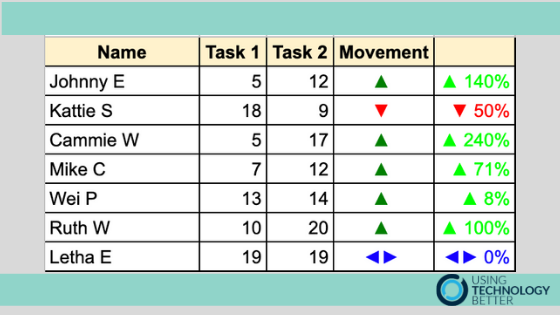
If you have multiple people contributing to a shared Google Sheet, it can be difficult to keep track of all the changes being made. However, Google Sheets has some really useful features that can tell you when something has been changed and help you pinpoint exactly what was changed and by whom.

How can we use digital technologies to capture evidence of student thinking?

The idea of digital integration is one that we get asked about a lot! Many teachers are unsure just how they could bring coding, robotics, digital activities or technology in general into their programmes without making it a stand-alone ‘something else’ they have to find time in their day to fit in. This blog will give you three easy ways to get started.

Don’t write your stories – create them!

Why is it that in schools, more often than not, we simply ask students to ‘write’ their story. In many cultures, their traditions and histories are passed on mainly through the rituals of oral, not written, storytelling. This blog looks at a more creative way for students to tell their story.

G Suite - Sweet As. Tips and Tricks from the UTB Team

Google Workspace – Sweet As. Tips and Tricks from the UTB Team.

Here at UTB we do loads of training in G Suite with both corporate and education clients. So often we find that it’s the ‘little things’ that get the biggest reactions from our trainees. These ‘little things’ are usually pretty basic and simple but make a huge impact as they can help to increase your efficiency with tasks that you do everyday.